
Human themes
Human characters
A more lifelike companion
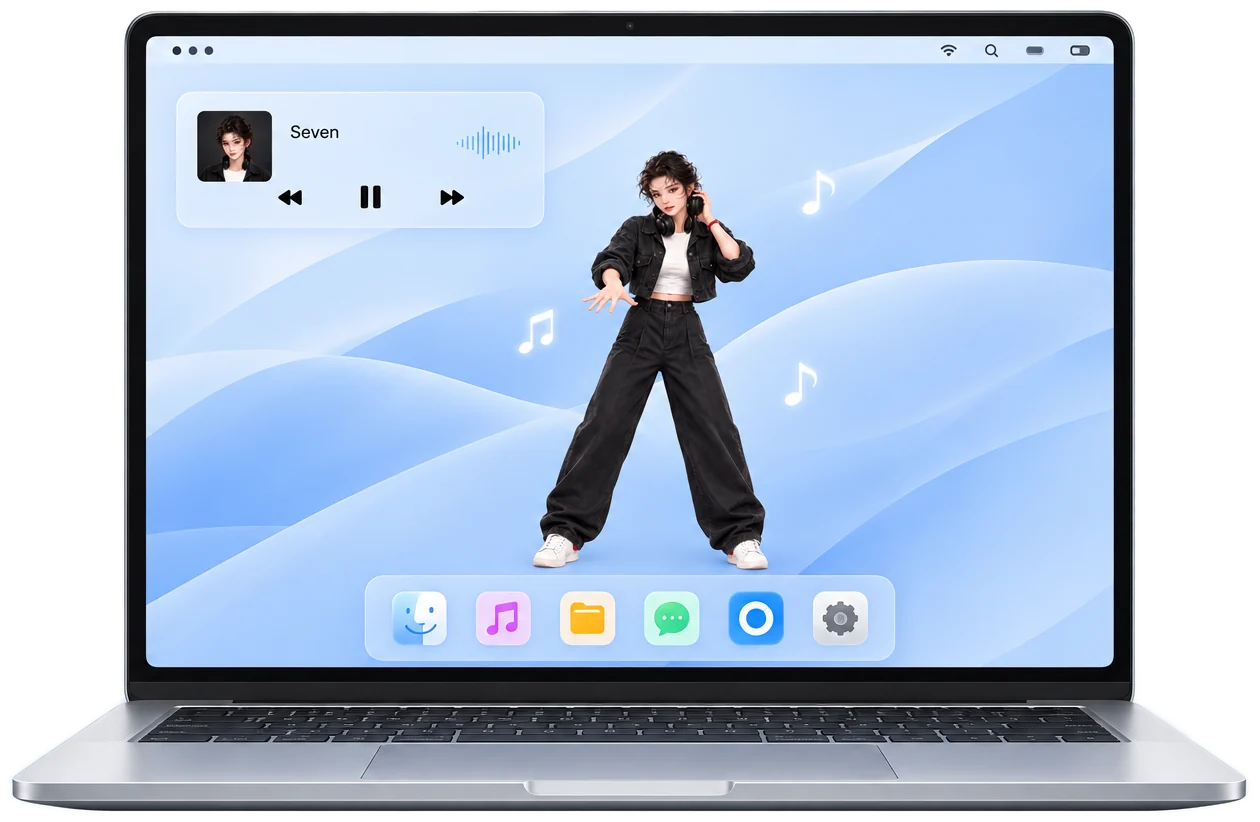
Jasmine has over thirty dance moves across five energy levels, from a gentle nod to full-body jumps.
Watch her danceLet music dance on your desktop
Sway lives on your Mac desktop. It listens to whatever you're playing and moves to the beat, so every song has a rhythm you can see.
macOS 14.4 or laterApple silicon & IntelFree

Music comes to life
Sway listens to whatever your Mac is playing, finds the beat and tempo in real time, and has the character step right on the beat with smooth, natural moves.
Pop, hip-hop, electronic or something mellow; Apple Music, Spotify or a browser tab, it keeps up.
No beat yet, so she's dancing the groove moves at normal speed

Reads your Mac's audio output directly. No microphone, and any app works.

Finds the beat first, then picks the moves. Faster songs, faster steps.

From idle and a gentle sway to full-body jumps. The harder the music, the bigger the moves.

Jasmine in a realistic style, plus nine cats with personalities of their own.

No window frame. Drag it around, click right through it, or tuck it away.

Shows the song and artist above her head, or the tempo when there's no track info.
Your Sway, your style
Switch between Jasmine and the cat companions with one click. Size, language, the bubble, click-through and always-on-top all adjust to how you like it.
Click the Sway icon in the menu bar and the settings panel pops up.
See all features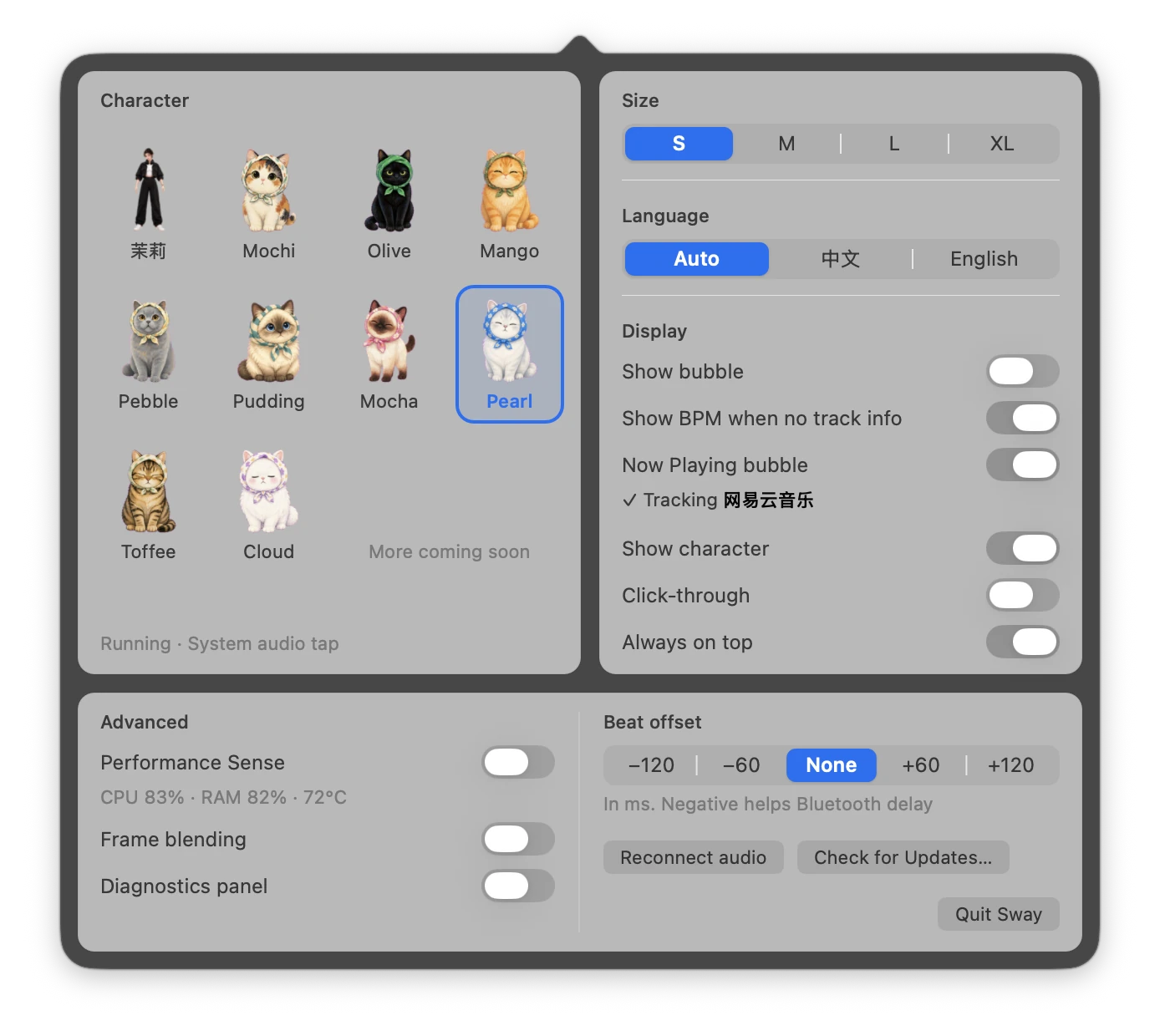
Under the hood
Single-digit CPU while music plays, and nothing is redrawn when nothing changes.
 System audio tapGets the system mix directly, unaffected by room noise
 Fallback captureSwitches to a backup path if the main one isn't available
 Tempo memoryRemembers each song's tempo and locks on instantly next time
 Performance senseA bubble pops up when CPU, memory or temperature run high
 Hardware video decodeDecodes as it plays, keeping only a few frames in memory
 Cats with moodsWithout music, they act according to how busy your Mac is
Human themes
A more lifelike companion
Jasmine has over thirty dance moves across five energy levels, from a gentle nod to full-body jumps.
Watch her danceSprite companions
Soft, cute and comforting
Nine cats, each with a personality. With music they bounce to the beat; without it, they find something to do depending on how busy your Mac is.
Take one home
Get Sway

Desktop companion for macOS
Download SwayFAQ
Sway is a desktop pet for macOS, though we like to call it a desktop companion. It lives on your Mac desktop, listens to whatever the system is playing, finds the beat and tempo in real time, and has a character dance right on the beat. You can pick Jasmine, a realistic character, or one of nine cats.
Yes. There's no account to create and there are no ads.
It needs macOS 14.4 or later and runs on both Apple silicon and Intel Macs.
Anything that plays sound through your Mac: Apple Music, Spotify, NetEase Cloud Music, QQ Music, or music and video in a browser. It reads the system output, so there's nothing to set up per app.
No. It reads your Mac's audio output, meaning what you're playing, not the microphone. The sound is analyzed on your Mac and discarded right away. Nothing is recorded, uploaded or stored.
macOS applies the audio permission when the app launches. After allowing it the first time, quit Sway and open it again. If it still doesn't move, click Reconnect audio in the settings panel.
Yes. It reads the system output, so it doesn't matter what you listen on. Bluetooth headphones add 100 to 200 ms of delay; if the moves feel early, pick a negative value under Beat offset in the settings panel.
Barely. It's nearly idle when it's quiet and uses single-digit CPU while music plays. Nothing is redrawn when nothing changes, and videos are decoded as they play, keeping only a few frames in memory.
App Store apps must run in a sandbox, and a sandboxed app can't read system audio. So it's only available here. The installer is signed and notarized by Apple, so macOS opens it normally.
Yes. It lets you know when a new version is out. Updates are signature-checked too, and nothing installs if the check fails.